4 min readUpdated Aug 28, 2026
Claude Code + omg.dev: work on your cloud Computer
Connect Claude Code to the omg.dev hosted MCP with OAuth. Run shell commands, delegate coding work, and read sessions on your cloud Computer.
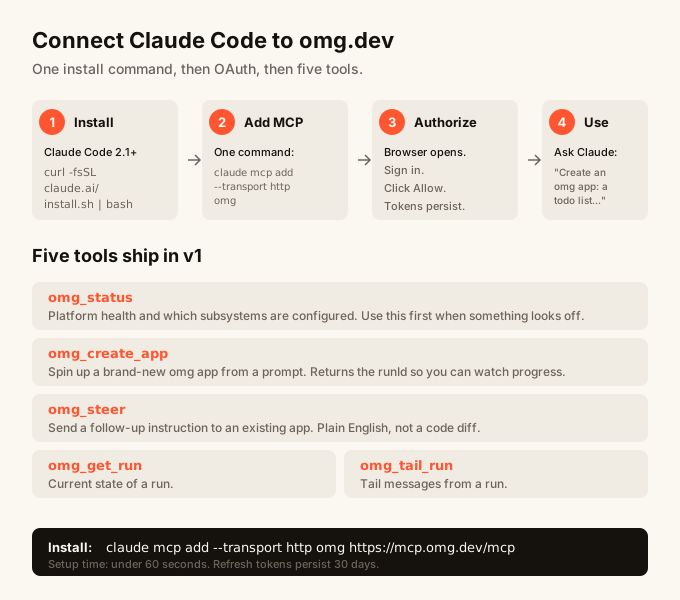
TL;DR
omg.dev has an OAuth-protected MCP server for cloud Computers. Add the exact Streamable HTTP endpoint to Claude Code:
claude mcp add --transport http omg https://mcp.omg.dev/mcp
Then ask Claude Code to call omg_status. Claude Code opens the OAuth flow.
After you sign in and approve access, it can run short commands, delegate
longer work, and read coding-agent sessions on your omg Computer.
The endpoint includes /mcp. https://mcp.omg.dev is the OAuth resource
identifier and a compatibility endpoint. New client configuration must use
https://mcp.omg.dev/mcp.
Step 1: Add the hosted MCP
Run:
claude mcp add --transport http omg https://mcp.omg.dev/mcp
That stores the remote server in Claude Code. claude mcp list can show that
the server needs authentication until the first tool call completes.
Step 2: Complete OAuth
Open Claude Code and use a direct prompt:
Call omg_status and tell me which Computers are available. Do not answer from memory.
The first call receives an OAuth challenge from mcp.omg.dev. Claude Code
opens an omg.dev sign-in and consent flow. Approve access, then return to
Claude Code. It completes the original call with the new access token.
Step 3: Use the tools
The hosted MCP exposes five tools.
omg_status
Lists your Computers and identifies the default. For each Computer that is
online it also lists the projects on it, with the absolute path of each one,
and the number of coding sessions already running there. One call is enough
for a new client to know which machine and which folder to work in. A new
account gets a cloud Computer when this tool is first called. The Computer can
report provisioning while it starts.
omg_bash
Runs one short shell command on a named Computer. Use the Computer slug from
omg_status. Commands are synchronous and have a time limit, so use this for
quick inspection and checks.
omg_delegate
Starts a longer coding-agent task on a Computer. It returns a session ID immediately. The task continues outside the current conversation.
omg_sessions
Lists the coding sessions a person is running, or searches session titles and
transcript text. Named bots, their child sessions, and scheduled routine runs
are left out. The result reports how many were left out. Pass includeBots to
see them.
omg_session
Reads recent messages from one session. Use the ID returned by omg_delegate
or omg_sessions.
Following a delegated session
omg_delegate also returns a resource URI, in the form
omg://computer/{slug}/session/{id}. A client that supports
resources/subscribe can subscribe to that URI. The server then sends
notifications/resources/updated when the session produces new messages.
Subscriptions need a connection that stays open, so the local stdio server
supports them today and the hosted endpoint does not advertise them. Where
subscriptions are unavailable, read the session with omg_session when you
want an update.
What to do when something goes wrong
The client says the host did not load
Use the full endpoint:
https://mcp.omg.dev/mcp
Opening the origin in a browser shows endpoint discovery. It is not the canonical MCP endpoint.
Authentication does not start
Adding the server and authenticating it are separate actions. Force a real
tool call with: Use the omg_status tool. Do not answer from memory.
The consent page is blank
Sign in at https://app.omg.dev in the same browser, then retry the MCP tool
call.
The token endpoint reports requested resource invalid
Use the published endpoint without changing its host or path. The server accepts the resource forms used by supported MCP OAuth clients.
ChatGPT is a different setup
Do not paste the Claude Code setup prompt into ChatGPT mobile. ChatGPT custom
MCP apps are configured on ChatGPT web through Settings → Apps → Create.
Enter https://mcp.omg.dev/mcp, scan the tools, and complete OAuth. A Workspace
Agent must receive the app through its builder controls. ChatGPT Agent mode
does not use custom apps.
See OpenAI's current developer mode and MCP app documentation for plan and workspace restrictions.
Hosted MCP versus local MCP
The hosted endpoint controls an omg cloud Computer. The local omg mcp
command is a separate surface that controls sessions from your own
omg serve installation. See the MCP documentation
for both paths.
The retired prompt-to-app builder tools are not part of either current setup.
FAQ
Is the hosted MCP only for Claude Code?
No. A client can connect if it supports MCP Streamable HTTP and OAuth 2.1 with PKCE. Client configuration steps differ, so use the client's supported MCP settings or command.
Why is the endpoint under /mcp?
The host also serves health and OAuth discovery routes. /mcp is the
Streamable HTTP route. The OAuth resource identifier remains
https://mcp.omg.dev.
Can I revoke a client?
Remove the MCP entry from the client and revoke its OAuth token through the omg.dev authorization server.
Can I add the hosted MCP from ChatGPT mobile?
No. OpenAI requires custom MCP app setup on ChatGPT web. A mobile conversation cannot create the app or finish the tool scan.
Is omg mcp the same server?
No. omg mcp is a local stdio server for sessions managed by your local
omg serve process. https://mcp.omg.dev/mcp is the hosted OAuth server for
an omg cloud Computer.
Where do I file a bug?
The server source is in apps/mcp/ in the omg.dev repository. The contributor
reference in apps/mcp/README.md describes the OAuth contract and deployment
workflow.