6 min read
OpenCode vs pi: Batteries Included or Build It Yourself
OpenCode ships plan mode, subagents, MCP and permissions. pi removes all four on purpose and hands you an extension API. Which terminal agent fits you.
Open the matching app starter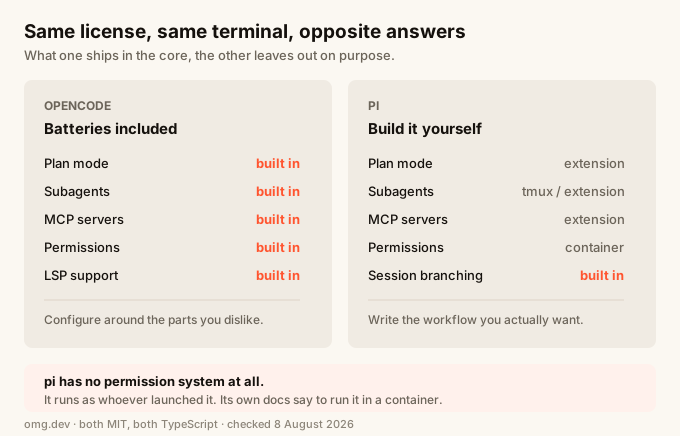
TL;DR
OpenCode and pi are both MIT-licensed terminal coding agents written in TypeScript, and they disagree about almost everything else. OpenCode ships plan mode, subagents, MCP servers, LSP and a permission system in the core. pi removes all four on purpose and gives you a TypeScript extension API to rebuild whichever ones you actually use. Pick OpenCode if you want the features to already be there. Pick pi if you have a specific workflow and every built-in feature that does not match it feels like something to work around.
Quick comparison
| OpenCode | pi | |
|---|---|---|
| Repo | anomalyco/opencode | badlogic/pi-mono |
| npm package | opencode-ai |
@earendil-works/pi-coding-agent |
| License | MIT | MIT |
| Language | TypeScript | TypeScript |
| GitHub stars (Aug 2026) | ~195k | ~85k |
| Plan mode | Built in | No, by design |
| Subagents | Built in (@general) |
No, by design |
| MCP servers | Built in | No, by design |
| Permission system | Built in, plus policies | None, containerize instead |
| LSP support | Built in | Via extension |
| Extension API | Plugins + SDK | TypeScript extensions, first-class |
| Desktop app | Yes (beta) | No |
| Session branching | Not in the core feature list | Yes, session tree with /tree |
What is OpenCode
OpenCode calls itself "the open source AI coding agent". It runs as a terminal UI, and also ships a CLI, a web interface, IDE integrations and a desktop app in beta for macOS, Windows and Linux.
It comes with two built-in agents you switch between with the Tab key. build is the default with full access. plan is read-only: it denies file edits by default and asks permission before running bash commands. A general subagent handles complex searches and multistep tasks, and you invoke it with @general in a message.
The documentation covers permissions, policies, LSP servers, MCP servers, custom tools, agent skills, plugins, an SDK and a server mode. The README is translated into 22 languages. This is a product with a surface area.
What is pi
pi describes itself as "a minimal terminal coding harness", and the pitch is "adapt pi to your workflows, not the other way around, without having to fork and modify pi internals".
It lives in the badlogic/pi-mono monorepo alongside a unified multi-provider LLM API, an agent runtime and a terminal UI library. The coding agent runs in four modes: interactive, print or JSON, RPC for process integration, and an SDK for embedding in your own apps.
The interesting part is what it refuses to include. pi's philosophy section is a list of deliberate omissions:
- No MCP. Build CLI tools with READMEs, or write an extension that adds MCP support.
- No sub-agents. Spawn pi instances via tmux, or build your own with extensions.
- No permission popups. Run in a container, or build your own confirmation flow.
- No plan mode. Write plans to files, or build it with extensions.
- No built-in to-dos.
You extend it with TypeScript extensions, skills following the Agent Skills standard, prompt templates and themes. You bundle those into pi packages and share them over npm or git.
Head-to-head
Features in the core vs features you add
This is the whole difference, and everything else follows from it.
OpenCode decides how plan mode works, then gives it to you. pi decides plan mode is a workflow choice, then gives you the API to write it. pi's extension API can register custom tools, replace built-in tools entirely, add subagents and plan mode, add permission gates and path protection, do git checkpointing, and integrate MCP servers.
Both positions are defensible. The cost of OpenCode's is that a built-in you dislike is something to configure around. The cost of pi's is that you write the thing, or find a package that already did.
Safety and permissions
OpenCode has a permission system and a policies layer, plus a read-only plan agent that will not edit files.
pi has neither, and says so plainly: it "does not include a built-in permission system for restricting filesystem, process, network, or credential access" and "runs with the permissions of the user and process that launched it".
pi's answer is isolation instead of prompts. Its containerization guide documents three patterns: a Gondolin extension that keeps pi and provider auth on the host while routing tools into a local Linux micro-VM, plain Docker, and a policy-controlled sandbox.
That is a reasonable trade, but only if you actually do it. An unsandboxed pi on your laptop has your SSH keys, your cloud credentials and your logged-in sessions.
Models and providers
Both are provider-agnostic, and pi documents its list in detail: subscription login for Anthropic Claude Pro/Max, OpenAI ChatGPT Plus/Pro and GitHub Copilot, plus around 30 API-key providers including OpenAI, Google Gemini, Amazon Bedrock, Groq, Cerebras, xAI, OpenRouter, DeepSeek and Mistral. It also supports a llama.cpp router server, so local models work.
If you are choosing a coding agent primarily by which model it can drive, this is close to a tie.
Sessions and history
pi stores sessions as JSONL files with a tree structure, where each entry has an id and a parentId. That enables branching in place instead of forking files. /tree moves through the tree in place, /fork starts a new session file from an earlier message, and /clone duplicates the active branch.
Being able to back up to the message before the agent went wrong, and take a different path without losing what it already tried, is genuinely useful on long tasks.
Which one is bigger
OpenCode is much larger. As of August 2026 it has roughly 195k GitHub stars and 25k forks, against about 85k stars and 11k forks for pi-mono. Both shipped releases within a day of each other, so both are alive.
Size matters here mostly for the third-party layer. More users means more plugins, more written-up configurations, and more chance that a problem you hit has already been answered.
Which should you use
Choose OpenCode if:
- You want plan mode, subagents and MCP to already work
- You want a permission prompt rather than a container as your first line of defence
- You want a desktop app or IDE integration, not only a terminal
- You would rather read documentation than write TypeScript
Choose pi if:
- You have a specific workflow and built-ins that do not match it get in the way
- You are comfortable writing a TypeScript extension to add what you need
- You already run your agent inside a container or VM, so the missing permission system costs you nothing
- Session branching matters to how you work
- You want the agent embedded in your own app through an SDK or RPC
Run either one somewhere that already sandboxes it
Both agents are more useful when they run somewhere with real access and real isolation. That is the point of the access model over the integration model.
It matters more for pi. pi's own documentation tells you to containerize it, because there is no permission layer to fall back on. An omg.dev Computer is a hardware-isolated virtual machine. That satisfies the requirement, and it does the same job for OpenCode without you configuring anything.
omg runs OpenCode, pi, Codex and Claude Code inside a cloud Computer, so you can change agents without rebuilding your setup. If you would rather do it yourself on a box you own, the Claude Code on a VPS guide covers the same ground manually.
For the wider question of where an agent should run at all, see where to run your coding agent.
Frequently asked questions
What is the difference between OpenCode and pi?
OpenCode ships features in the core: plan mode, subagents, MCP servers, a permission system and LSP support. pi deliberately leaves all of those out and gives you a TypeScript extension API to add the ones you want. Both are MIT licensed terminal coding agents written in TypeScript.
Does pi support MCP?
Not in the core. pi's documented position is "No MCP", and it suggests building CLI tools with READMEs instead, or writing an extension that adds MCP support. OpenCode supports MCP servers out of the box.
Does pi have a plan mode or subagents?
No. pi's philosophy section lists "No sub-agents" and "No plan mode" as deliberate choices. It suggests spawning pi instances via tmux for parallel work, writing plans to files, or installing a third-party pi package. OpenCode has a built-in read-only plan agent and a general subagent.
Is pi safe to run without a sandbox?
pi has no built-in permission system and runs with the permissions of the user that launched it. Its own documentation says to containerize it, and ships a containerization guide covering a Linux micro-VM, plain Docker and a policy-controlled sandbox. Treat a container as required, not optional.
Which models do OpenCode and pi support?
Both are provider-agnostic. pi lists around 30 API-key providers plus subscription login for Anthropic Claude Pro/Max, OpenAI ChatGPT Plus/Pro and GitHub Copilot, and it supports a llama.cpp router server for local models. OpenCode also supports many providers through its own provider configuration.
Which is more popular, OpenCode or pi?
OpenCode is larger. As of August 2026 the OpenCode repository has about 195k GitHub stars against roughly 85k for pi-mono. Both are actively developed, with releases published within a day of each other.
What npm package should I install for pi?
Use @earendil-works/pi-coding-agent. The older @mariozechner/pi-coding-agent package is deprecated, and npm returns the notice "please use @earendil-works/pi-coding-agent instead going forward". Its last publish was 0.73.1 in May 2026.