4 min read
I Rebuilt Tetris Battle to Play With My Uni Best Friend Again
Facebook's Tetris Battle shut down in 2019. I rebuilt it with AI so my best friend and I could battle again, with G.E.M. songs we listen to together.
 By Angel LuiLinkedInBuild a 2-player block battle on omg.dev
I made my first friend at university playing Tetris Battle.
Two boards side by side, two minutes on the clock, and every line you clear sends junk to the other side. You can't talk much while you're stacking that fast. But you laugh at the same moments and say "one more" at the same time. Round by round, a stranger became my best friend.
Then it closed. Tetris Battle shut down with Tetris Online on 31 May 2019, and there was nothing left to open.
So I rebuilt it with AI. Now we play again, with our friends, while our favourite singer plays for both of us.
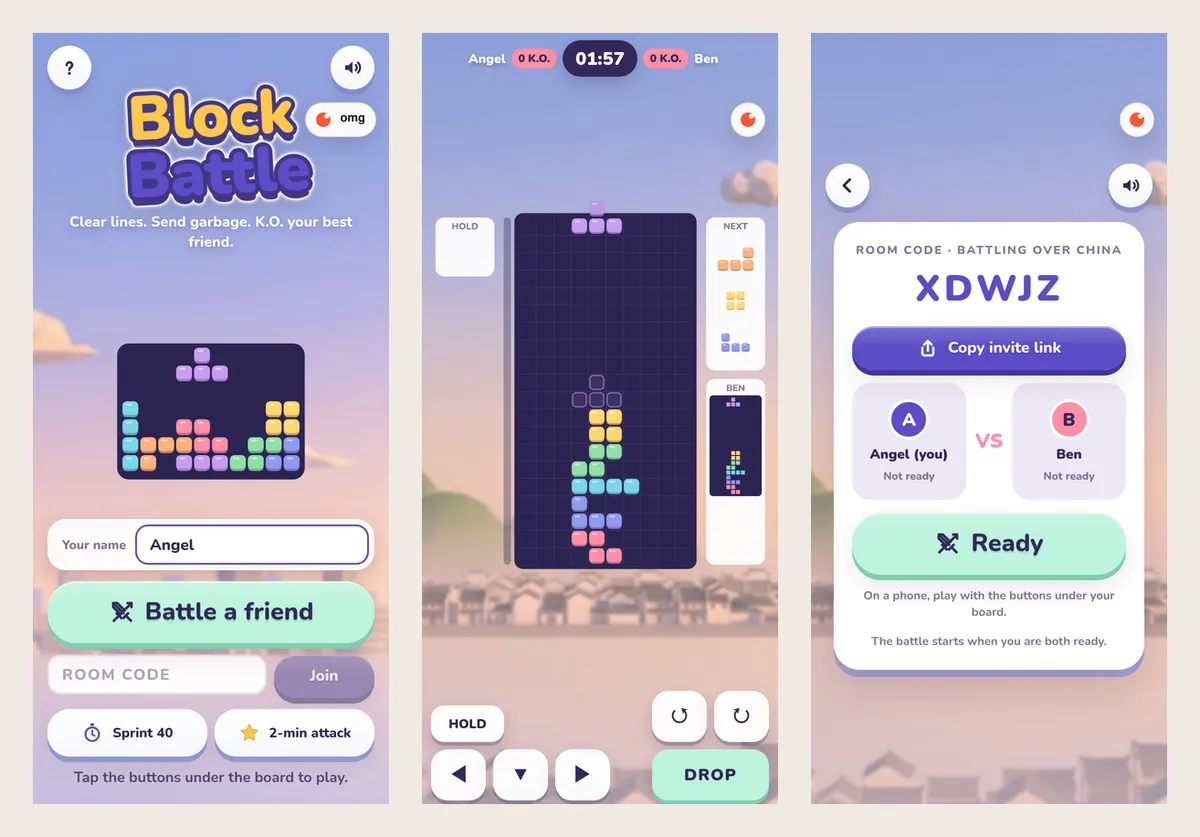
The menu, a live battle, and the lobby where you wait for your friend.
The short version
- Play it: Block Battle. Tap "Battle a friend" and send the link.
- Build your own: describe the game you miss, ask for a plan first, then play it together and ask for fixes.
- Use a new name. "Tetris" is a trademark.
- Add music legally with the singer's official YouTube videos.
Step 1: Ask for a plan first
My first message on omg.dev:
I want to rebuild it since this is the favorite game for me n my best friend. Can you see the skyline game Benny created for the multiplayer setting? I want the real time battle with my friend. Plan before we make it.
Skyline Stack is another omg.dev game with a two-player mode and a pastel look I liked. The agent replied with a plan and three questions. I answered in one line: desktop first, call it Block Battle, use Skyline's style.
A plan costs one message. You see what the agent understood before it builds anything.
Pick your own name, too. "Tetris" is a trademark, so describe yours as a falling-block game and give it a name your friends will say: "Block Battle tonight?"
Step 2: Describe the battle rules
Write the rules the way you'd explain them to a friend. The button at the top of this page fills in a shorter version.
- Same pieces for both players, so it's fair.
- Clearing lines attacks. The table below shows how much junk you send.
- Junk waits in a red bar. Clear lines in time to cancel it. Lock a piece without clearing and it rises.
- Topping out is a K.O., not game over. Your board clears and you keep going.
- Two minutes per round. Most K.O.s wins.
| You clear | Junk lines sent |
|---|---|
| 2 lines | 1 |
| 3 lines | 2 |
| 4 lines | 4 |
| T-spin double | 4 |
| Whole board clear | 10 |
Combos and back-to-back clears add a little more. For practice there's Sprint 40 (clear 40 lines fast) and 2-min attack (most points in two minutes).
Step 3: Play it together and ask for fixes
The first version was playable that evening. The real test was playing it with my friend. These are messages I actually sent between rounds:
- "fix the uiux, add some exciting background music"
- "…fix mobile uxui… add app icon"
- "hi can you be quick since i wanna play now"
- "fix the ui", with a screenshot of the results popup squashing the boards
Each fix took one message. A screenshot and "this looks wrong" is enough.
Step 4: Add the songs you love, legally
My friend and I both love G.E.M. So I asked: "can i add gem music? is it legal?"
Copying her songs into the game isn't. Instead, Block Battle opens the official YouTube player with videos from her own channels. The music streams from YouTube with YouTube's ads, so she still gets the plays.
Then I asked: "I want us to listen to the same song when we are playing." Now, in a battle room, a song one of us picks plays for both of us, kept within half a second. When it ends, the next one starts for both. Either of you can stop it just for yourself.
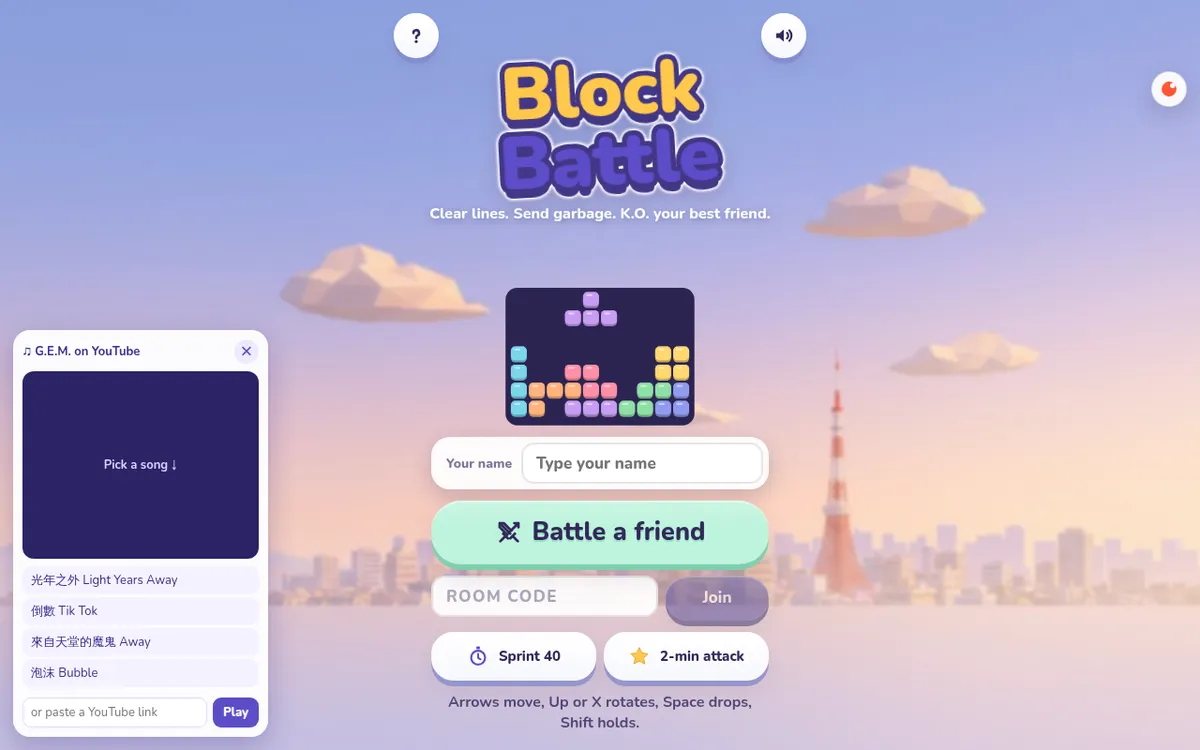
The game's own background music is original: two songs by Benny Kok from his Rhythm Game Starter.
Step 5: Send the link
Tap Battle a friend and copy the invite link. Your friend opens it, types a name and joins: no account, no download. You both tap Ready, a three-second countdown starts, and you're in. Keyboard on a laptop, buttons under the board on a phone.
How the live battle works
Useful to know when you ask for changes:
- No game server. Both browsers start from the same number, so both get the same pieces.
- Each side reports only its own board, lines sent and K.O.s. The other side reads them live.
- Attacks can't get lost. Each side keeps a running total of lines sent, and the other side takes only what's new, so a slow connection never drops or doubles one.
- The lobby shows the delay between you before you start.
Make yours
Think of the game you and your friends used to play. Describe it, ask for a plan, give it a new name, and play the first version together. Then fix what bugs you, one message at a time.
Play ours first: block-battle-bynn9.omgs.app.
Want a party game for a bigger group? Read how we made a multiplayer quiz game with AI.
Frequently asked questions
Is Tetris Battle on Facebook still available?
No. Tetris Battle closed with Tetris Online on 31 May 2019. You can't play the original any more, but you can build your own version with AI and play it with friends from a link.
How do I play a falling-block battle with a friend online?
Open Block Battle at block-battle-bynn9.omgs.app, tap Battle a friend and send the invite link. Your friend opens it, types a name and joins. No account or download is needed. Both tap Ready and the 2-minute round starts.
Can I call my game Tetris?
No. Tetris is a trademark. Give your game its own name, like Block Battle, and describe it as a falling-block game.
Can I add my favourite singer's songs to a game?
Use the official YouTube player with videos from the singer's own channels. The music then streams from YouTube, with YouTube's ads, instead of from files you don't have the rights to. Don't upload MP3s you didn't make or license.
Do I need to know how to code?
No. I described the game, answered three questions about the plan, and asked for fixes in plain words while we played. The agent wrote the code, tested a battle in two browsers and published it.
Does it work on phones?
Yes. On a phone there are buttons under the board for moving, rotating, holding and dropping. On a computer you use the arrow keys, Space and Shift.